Every product roadmap we have reviewed in the past year has an AI line item on it. Perhaps a third of them should. The rest are there because a board member asked, a competitor shipped something, or the phrase “AI-powered” seemed necessary for the next funding round.
This is a practical filter for deciding which AI features in apps are worth building — which ones reliably return their cost, which ones quietly burn a quarter, and how to tell the difference before you commit engineering time.
The three-part test for AI features in apps
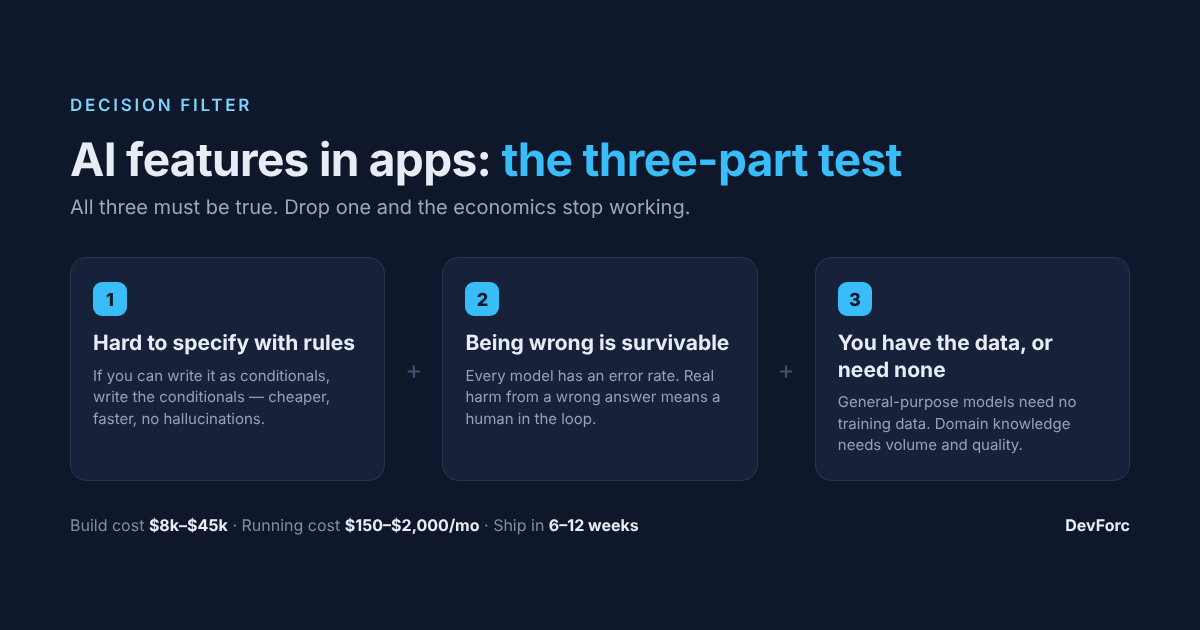
Most AI features in apps earn their place when three things are true at once. Drop any one and the economics stop working.
- The task is genuinely hard to specify with rules. If you can write the logic as conditionals, write the conditionals. They are cheaper, faster, debuggable, and they do not hallucinate.
- Being wrong sometimes is acceptable. Every model has an error rate. If a wrong answer causes real harm — a mispriced invoice, a missed safety alert — you need a human in the loop, and that changes the cost case entirely.
- You have the data, or the task needs none. Features built on a general-purpose model need no training data. Anything requiring your own domain knowledge needs volume and quality you may not have.
Which AI features in apps reliably work
Summarisation and extraction
Turning long unstructured text into short structured output: call notes into CRM fields, invoices into line items, support threads into a summary for the next agent. This is the highest-return category in business software because the task is tedious for humans, errors are visible and correctable, and no training data is needed.
Search that understands intent
One of the most dependable AI features in apps: semantic search over your own documents, tickets or product catalogue. Users ask in their own words and get relevant results rather than keyword matches. It is a contained, well-understood piece of engineering with a clear before-and-after.
Classification and routing
Sorting incoming items — tickets by urgency, applications by completeness, transactions by risk. Errors are cheap because a misrouted item is merely re-routed, and accuracy is easy to measure against what your team does manually today.
Drafting with a human approving
First drafts of replies, descriptions, reports — always with someone reviewing before it leaves the building. The productivity gain is real and the risk is contained by the review step.
Which AI features in apps usually disappoint
A chatbot bolted onto an existing product. Most users prefer a well-designed interface to a conversation with one. Chat works when the input space is genuinely open-ended; it fails when it replaces three clicks with a paragraph of typing.
Forecasting on thin data. Demand prediction, churn scoring and similar models need years of clean history. With eighteen months of messy data you will produce a number that looks authoritative and is not.
Recommendations before you have traffic. Recommendation engines need behavioural volume. Below a few thousand active users, hand-curated rules outperform them and cost a fraction.
Fully autonomous anything. Removing the human from a consequential decision multiplies your risk and your compliance burden. Start with assistance; automate only after the error rate is measured in production.
What AI features in apps cost
Rough build cost, plus the running cost people forget to budget:
| Feature | Build | Monthly running cost |
|---|---|---|
| Summarisation / extraction | $8k–$25k | $200–$2,000 in API usage |
| Semantic search | $15k–$45k | $300–$1,500 (vector store + embeddings) |
| Classification / routing | $10k–$30k | $150–$1,000 |
| Custom trained model | $60k–$200k+ | $2,000–$15,000 (hosting + retraining) |
Two costs of AI features in apps sit outside that table and catch people out. Evaluation — you need a test set and a way to measure quality, typically 15–25% of build effort, and it is not optional. Drift — model providers update their models, and output changes without you doing anything, so budget ongoing monitoring. The NIST AI Risk Management Framework is a useful starting point for structuring that evaluation and monitoring work.
For how this fits into a wider budget, see our breakdown of custom software development cost.
Build on an API, or train your own?
For the overwhelming majority of AI features in apps, use a commercial model API. It is faster, cheaper, and the quality ceiling is higher than anything you will train in-house without a dedicated ML team.
Training or fine-tuning your own makes sense in three cases only: data genuinely cannot leave your infrastructure for regulatory reasons; your domain language is so specialised that general models fail measurably; or your volume is high enough that per-call pricing exceeds the cost of hosting.
Whichever route you take, build an abstraction layer between your product and the model provider from day one. Providers change pricing, deprecate models and adjust behaviour. If model calls are scattered across your codebase, switching becomes a rewrite — the same technical debt pattern that catches teams on every fast-moving dependency.
How to scope your first AI feature
Once you have chosen which of the AI features in apps to attempt first, scope it like any other delivery risk.
Pick a task your team already does manually. You then have a baseline to measure against and a clear definition of good enough.
Define the acceptable error rate before you start. “90% of extractions correct, with the rest flagged for review” is a specification. “It should work well” is not, and it will produce a project nobody can call finished.
Ship it to a small group first. AI features fail in ways conventional software does not — plausible but wrong output that passes testing and gets caught by a real user with real context.
Make the output editable. Users trust AI features far more when they can correct them, and the corrections become your evaluation data.
This is the same discipline as any other scoping exercise — our guide to MVP scoping applies directly.
Frequently asked questions about AI features in apps
Do I need a data scientist to add AI features to my app?
Not for API-based features. A competent backend team can build summarisation, search and classification. You need ML specialists only when training or fine-tuning your own model.
How accurate do AI features need to be?
It depends entirely on the cost of being wrong. For drafting and suggestions, 80% is useful. For anything that affects money, safety or compliance, you need a human approval step regardless of measured accuracy.
Is my data safe with a commercial model provider?
Enterprise API tiers generally contract not to train on your data and offer regional processing. Read the specific terms, and check them against your own obligations — particularly if you handle personal or regulated data. The UK ICO’s guidance on AI and data protection sets out what regulators expect here.
How long does it take to ship a first AI feature?
Six to twelve weeks for a well-scoped API-based feature, including evaluation and a limited rollout. Custom model work runs several months longer.
Have AI features in apps on your roadmap and want an honest read on whether they are worth building? Book a 30-minute consultation.